
Mode breakdown
Why this hockey broadcast experiment matters
Tom Buck’s YoloBox Extreme sports broadcast setup is worth paying attention to because it answers a question that creators keep asking in different forms: what happens when a piece of gear leaves the demo table and has to function in a real venue? In this case, the venue is a local rink, the format is hockey, and the test is a playful one Buck dubs the Super Yolo World Hockey Championship. The joke is part of the appeal, but the real value sits underneath it. He is not just showing off cameras. He is showing what a working multicam production looks like when time, space, and operator attention are all limited.
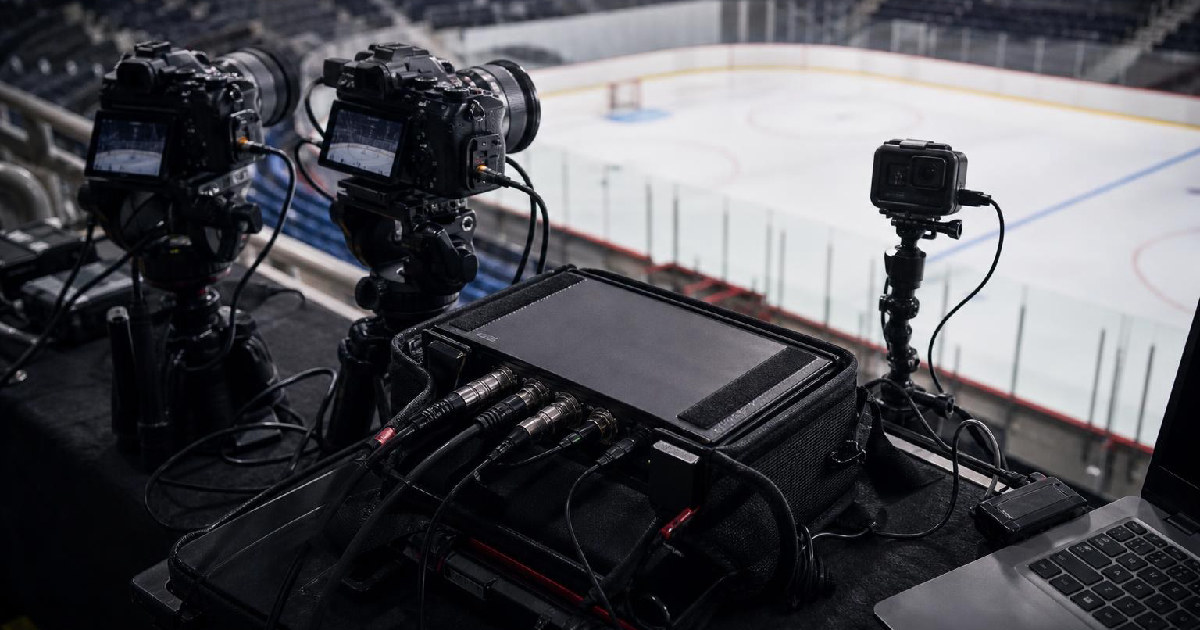
Buck is clear about the conditions from the start. He is using what he already owns, not a dream kit assembled for a perfect shoot. That matters because the setup changes shape when you are trying to make the most of mirrorless cameras, a tracking camera, a webcam built for commentary, and a control surface that can handle the switching, graphics, and replay side of the job. The result is less like a consumer unboxing and more like a real production problem solved in public.
The core lesson: use gear that matches the job you can actually run
The first useful takeaway from Buck’s experiment is his willingness to call out the mismatch between ideal and available tools. If he had his way, he says he would use camcorders for this kind of sports work because the wide-to-tight zoom range and smooth power zoom behavior are better suited to a rink. Instead, he works with Sony mirrorless bodies, which give him strong image quality but also create more handling issues.
That tradeoff shapes the entire production. One camera, the Sony FX3, is fitted with a 70-200mm lens to cover an end zone and pull tight when the action moves there. Another Sony camera is assigned the wide shot with a 16-35mm lens, meant to hold the full rink when nobody is available to pan constantly. A third mirrorless body handles the opposite side of the ice with a 24-70mm lens that Buck describes as a practical fit for a cramped setup.
The important part is not the exact kit list. It is the structure: a wide shot, a tight zone shot, and a second angle that catches the other end of the rink. That is a sensible pattern for any small crew trying to cover sports without building a full broadcast truck. Buck also acknowledges that some of the gear he uses is more capable than what most people would need. He keeps circling back to the same point: the production can be simple or more elaborate, but it still has to fit the crew and the space.
How Tom Buck split camera roles across the rink
Buck’s camera choices make the most sense when you think about operator load. He does not treat every camera as something that needs a dedicated human. Instead, he splits the job between static, semi-static, and actively operated sources.
The GoPro placed on a long selfie stick becomes a high, central view of the ice. It solves a problem the other cameras cannot, mainly because the wall and rink layout prevent him from backing a Sony camera far enough away to get the whole surface. That is a smart example of adapting to venue constraints rather than fighting them. The GoPro is not there to look fancy. It is there because it can occupy a position the larger camera cannot.
The OBSBOT Tail 2 fills another useful niche: tracking. Buck uses it with the expectation that it can follow action without requiring a person to stay on it the whole time. He is also realistic about its limits. When the view is obstructed by rink glass and corner angles, tracking gets harder. That is not framed as a failure so much as a reminder that automated movement works best when the subject is visible and the environment is open.
Then there is the human operator. Buck has his wife Heather running one of the end cameras, and that ends up mattering more than any automation. His point is straightforward: a human following the play still produces the best dynamic framing. The software and the smart camera are helpful, but if you can get a person on one angle, the production immediately feels more alive.
Audio, replay, and scoreboard control without turning the desk into chaos
The technical center of the whole setup is the YoloBox Extreme, and Buck uses it like a hub rather than a novelty. It handles the inputs, the 4K recording, the scoreboard, the timer, and the instant replay workflow. The YoloDeck makes the setup much easier to run because it keeps the most important actions off the touchscreen. That is the kind of detail that matters in sports, where the person at the desk cannot afford to tap through menus while the puck is moving.
Buck’s replay setup is especially telling. He configures the YoloDeck so he can capture the last several seconds of action and then jump into replay when something worth showing happens. That does two things. First, it makes the broadcast feel closer to a real sports show. Second, it keeps the editor’s job from becoming a scramble after the fact. Instead of hoping the exciting moment will still be useful later, the system already preserves it.
Audio is handled with the same practical mindset. Buck does not build a complicated mixer rig; he keeps it simple. The cameras themselves carry audio where needed, and he uses a DJI mic for commentary plus a Rode Interview Pro for rinkside player interviews. That lets him move between play-by-play, ambient sound, and short interviews without turning audio management into the main event. He also notes that he adds delay to keep sources in sync, which is a small detail with a big impact in sports, where unsynced sound would be immediately distracting.
What creators can borrow from this workflow
The best part of Buck’s video is not that he proves one specific product can handle a hockey broadcast. It is that he shows how a creator can make a production feel complete without overbuilding it. He had around 45 minutes to set up, limited space to work with, and a rink layout that forced compromises. Under those conditions, the production still held together because the system was built around roles, not gear flexing.
That gives smaller creators a few practical ideas to copy:
- Assign each camera a job before the event starts.
- Use a high, wide shot to preserve coverage when movement is limited.
- Put a human on the most important moving angle if you can.
- Use tracking cameras where they can actually see the action.
- Keep audio sources simple enough that one person can manage them.
- Put replay and scoreboard functions on physical controls if the platform supports it.
Buck also does something that many gear videos avoid: he admits the setup is not ideal and still presents the outcome as a success. That honesty is part of why the video works. The lesson is not that every creator should recreate his rink setup exactly. It is that a well-designed production can survive a lot of real-world friction if the workflow is built around what the crew can realistically control.
For creators looking at sports, live events, or any fast-moving environment, that may be the most useful part of the experiment. The YoloBox Extreme is the anchor, but the real story is the system around it: cameras assigned by purpose, audio kept manageable, replay made fast, and enough flexibility to adapt when the venue forces a change.
Recommended next
Products & tools
One Mode Digital Media product and one relevant affiliate recommendation selected for this page.
Perpetually Online
A collegiate-style internet culture design for people who practically live on the web. “Perpetually Online” turns constant connectivity into a tongue-in-cheek badge of honor for creators, gamers, streamers, social-media regulars, and professional tab keepers.
Artlist
Music, footage and creative assets for video-first creators.